Current section
Files
Jump to
Current section
Files
priv/samples/basics/button.livemd
# Button Input using Circuits GPIO
## Introduction
In this exercise, we will use the [circuits_gpio](https://github.com/elixir-circuits/circuits_gpio) library to control
a GPIO as an input and output, turning an LED on and off with a button press.
## Try it out
Lets set a variable for the LED and button so that we dont have to choose the GPIO pin every time.
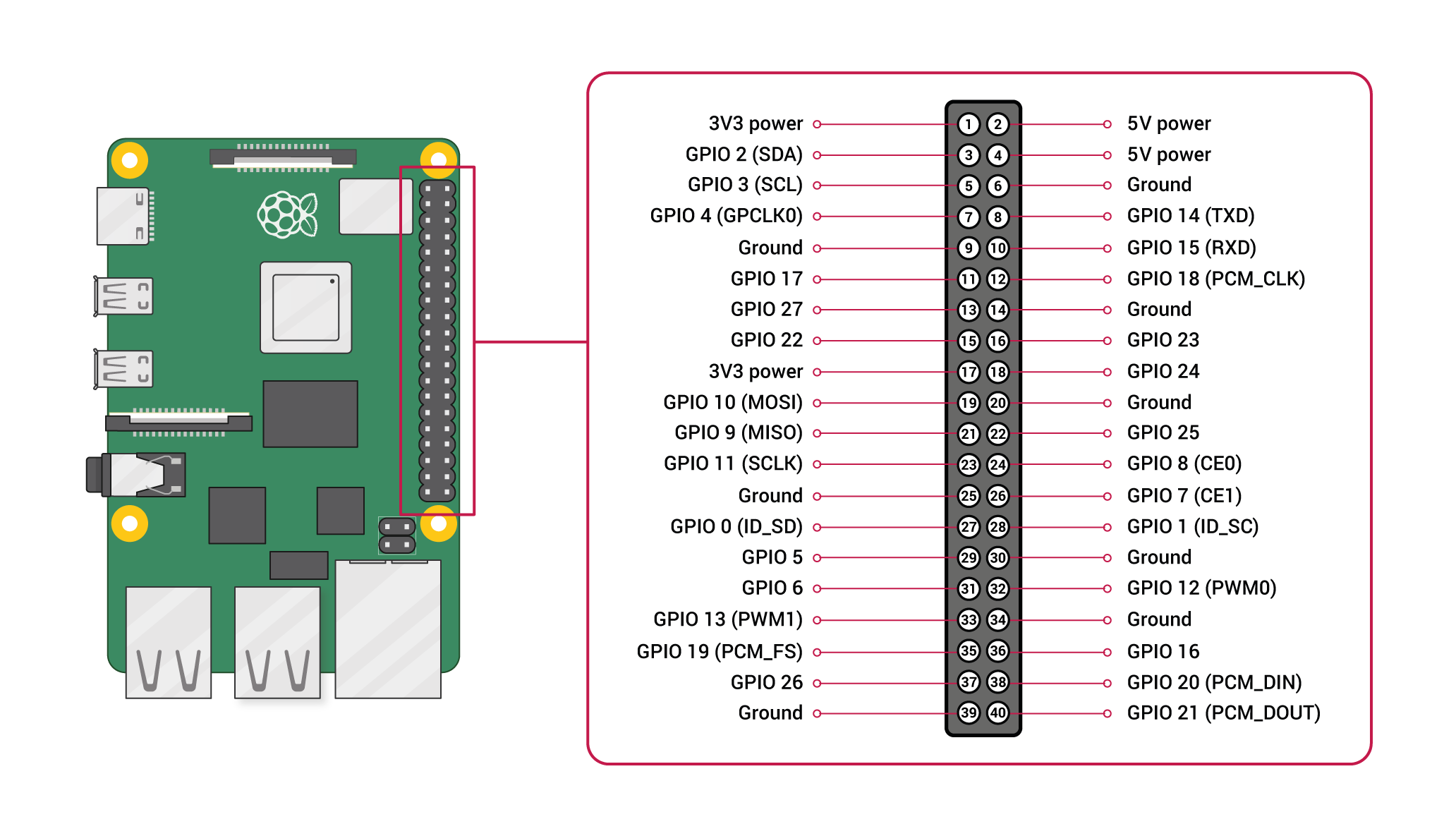
First, refer to the GPIO ports for your Nerves device.
```elixir
led_pin = 20
button_pin = 17
```
Alright! Now that we've selected our pins, make sure that we connect
the to our `led_pin` and `ground` through a 220Ω resistor. The long leg
can be connected to our `led_pin` and the short pin can connect from
the shorter leg to a 220Ω resistor, then to our ground.
Connect one of the legs of the button to a 10kΩ resistor to 5v, and the diagonal leg to your `button_pin`.
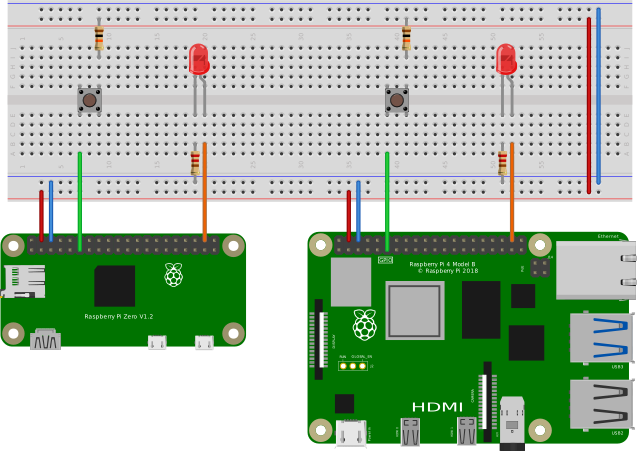
The following code will configure the `led_pin` as an `:output` and the `button_pin` as an `input`.
```elixir
{:ok, led_output} = Circuits.GPIO.open(led_pin, :output)
{:ok, button_input} = Circuits.GPIO.open(button_pin, :input)
```
Whenever you run the following code, it will read whether your button is pressed or not, and set the `led_output` to match.
```elixir
button_state = Circuits.GPIO.read(button_input)
Circuits.GPIO.write(led_output, button_state)
```
This example will listen forever for the input to change state, then toggle the `output_gpio` to the `input_gpio` state.
You have to hit `stop` where the `evaluate` button used to be for this function.
```elixir
# We will configure the button interrupts for both rising and falling.
Circuits.GPIO.set_interrupts(button_input, :both)
defmodule Button do
# Watch for the button press
def listen_forever(output_gpio) do
receive do
{:circuits_gpio, _p, _timestamp, 1} ->
Circuits.GPIO.write(output_gpio, 1)
{:circuits_gpio, _p, _timestamp, 0} ->
Circuits.GPIO.write(output_gpio, 0)
end
listen_forever(output_gpio)
end
end
```
Now we can call the `Button.listen_forever` function with our `led_output` as the argument.
```elixir
Button.listen_forever(led_output)
```
For a fun exercise, see if you can update the `Button.listen_forever` function to only change the `led_output` state on `:rising` only.