Current section
Files
Jump to
Current section
Files
priv/samples/basics/blink.livemd
# Blink using Circuits GPIO
## Introduction
In this exercise, we will use the [circuits_gpio](https://github.com/elixir-circuits/circuits_gpio) library to control
a GPIO as an output, and blink an LED.
## Try it out
Lets set a variable so that we dont have to choose the GPIO pin every time.
First, refer to the GPIO ports for your Nerves device.
In this example, we will be using pin 20 on the raspberry pi platform.

```elixir
led_pin = 20
```
Alright! Now that we've selected a pin, make sure that we connect
the to our `led_pin` and `ground` through a 220Ω resistor. The long leg
can be connected to our `led_pin` and the short pin can connect from
the shorter leg to a 220Ω resistor, then to our ground.
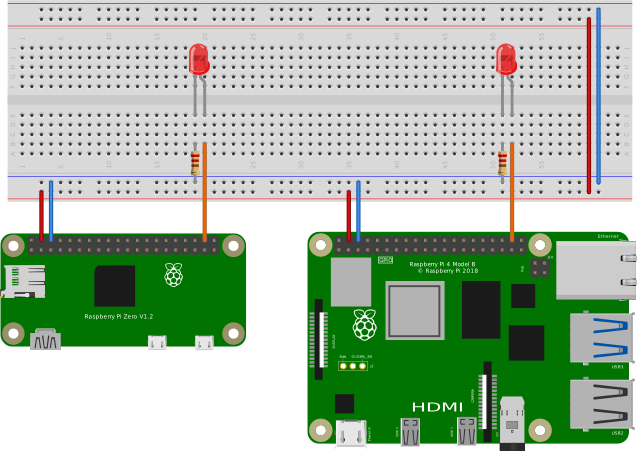
Now we will create a connection to that GPIO pin and set it as an :output.
```elixir
{:ok, led_output} = Circuits.GPIO.open(led_pin, :output)
```
After our led is wired to our GPIO pin, lets toggle it on:
```elixir
Circuits.GPIO.write(led_output, 1)
```
Then off:
```elixir
Circuits.GPIO.write(led_output, 0)
```
To take this one step further, we can write a short recursive function to blink the light on and off with a certain delay.
```elixir
defmodule Blink do
# Blink forever
def forever(output_gpio, delay \\ 1000) do
Circuits.GPIO.write(output_gpio, 1)
Process.sleep(delay)
Circuits.GPIO.write(output_gpio, 0)
Process.sleep(delay)
forever(output_gpio, delay)
end
# Default just giving a pin will match here and run at 1 second.
def pin(output_gpio) do
pin(output_gpio, 500, 3)
end
# Or provide a delay to blink faster or slower
def pin(_output_gpio, _delay, times) when times <= 0 do
# Do nothing after the count completes
end
def pin(output_gpio, delay, times) do
Circuits.GPIO.write(output_gpio, 1)
Process.sleep(delay)
Circuits.GPIO.write(output_gpio, 0)
Process.sleep(delay)
pin(output_gpio, delay, times - 1)
end
end
```
We can blink it using the default 1 second delay.
```elixir
Blink.pin(led_output)
```
Or with a set delay. This will blink 10 times every 100ms.
```elixir
Blink.pin(led_output, 100, 10)
```
Lastly, we can blink forever. You have to hit `stop` where the `evaluate` button used to be for this function.
```elixir
Blink.forever(led_output)
```
For a fun exercise, see if you can change the `Blink.forever` function to blink at 100ms instead of 1000ms.