Current section
Files
Jump to
Current section
Files
phoenix_replay
README.md
README.md
# PhoenixReplay 📹
[](https://hex.pm/packages/phoenix_replay) [](https://hexdocs.pm/phoenix_replay)
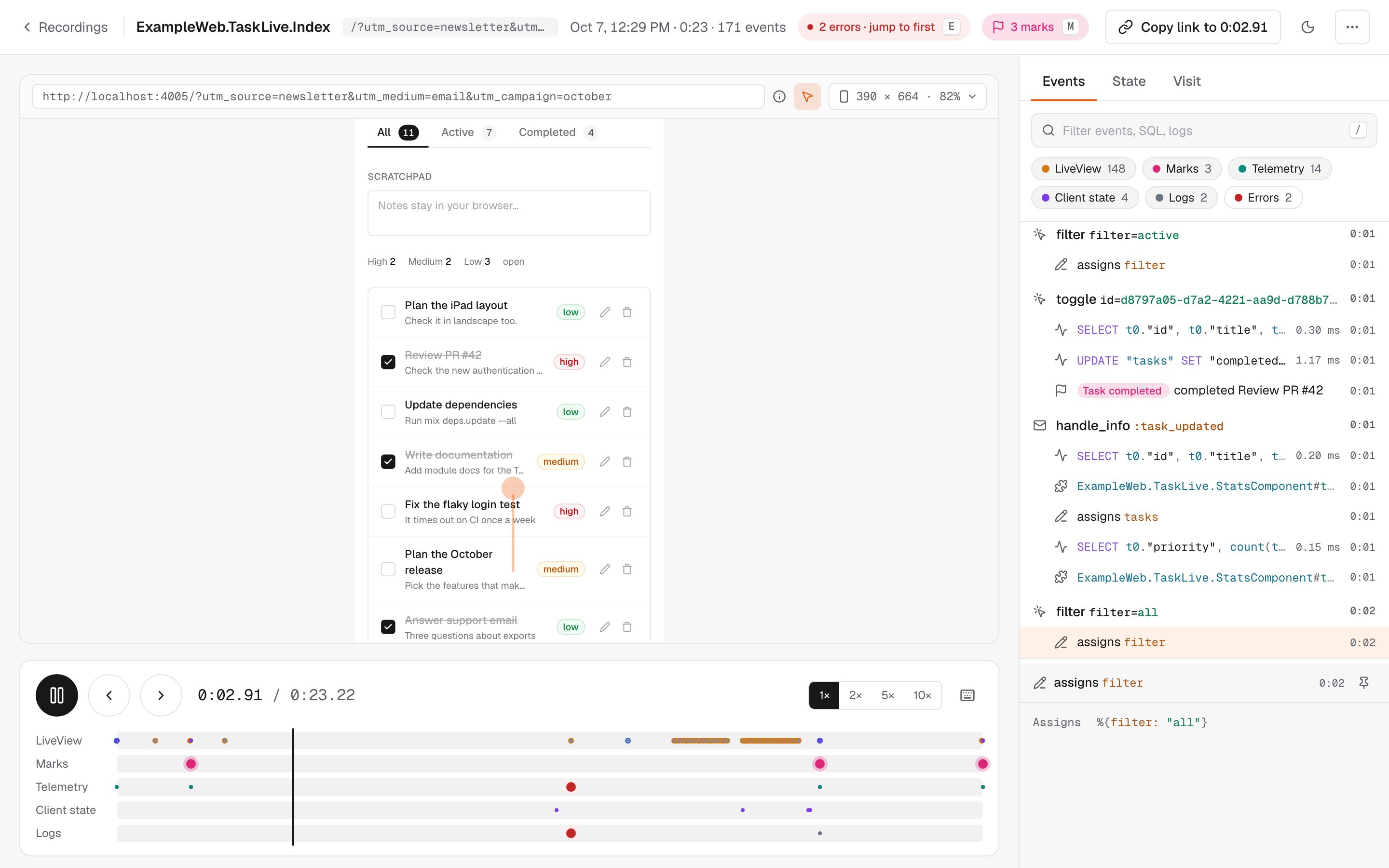
Session recording and replay for Phoenix LiveView. PhoenixReplay records what your LiveViews and LiveComponents did — events, navigation and assigns — and replays a session by re-rendering your own templates with the recorded assigns. No DOM snapshots: assigns and events are recorded on the server, and an optional browser recorder adds the pointer, touches, scrolling and form input.
```bash
mix igniter.install phoenix_replay
```
The installer mounts the dashboard at `/dev/replay` in development. Record a live session:
```elixir
live_session :default, on_mount: [PhoenixReplay.Recorder] do
live "/checkout", CheckoutLive
end
```
Use your app, then open `/dev/replay`. To use the dashboard in production, mount it behind your own authentication:
```elixir
scope "/admin" do
pipe_through [:browser, :require_admin]
phoenix_replay "/replay"
end
```
## Why PhoenixReplay
Browser session recorders capture the DOM and ship every keystroke from the client. A LiveView already knows its state: its template is a function of its assigns. PhoenixReplay records assigns on the server, where they are produced, and replays them through the same template — so a replay shows exactly what the server rendered, and a 30-second form session takes a few kilobytes.
See [Why PhoenixReplay](https://hexdocs.pm/phoenix_replay/why-phoenix-replay.html) and [How It Works](https://hexdocs.pm/phoenix_replay/how-it-works.html).
## Recording
Every connected LiveView in the live session is recorded, along with its LiveComponents — without changes to your views or components. Sessions without user interaction are discarded. Sample a share of sessions or tune limits per live session:
```elixir
live_session :checkout,
on_mount: [{PhoenixReplay.Recorder, sample_rate: 0.1, max_events: 2_000}] do
live "/checkout", CheckoutLive
end
```
In the browser, `replayParams` and `replayMetadata` send the viewport, so a phone session replays at phone size, and link sessions across LiveViews into one journey. `replayRecorder` records what only the browser sees: form input, and with `pointer: true`, the pointer, touches and scrolling. The installer adds all three:
```javascript
import { replayParams, replayMetadata, replayRecorder } from "phoenix_replay"
const liveSocket = new LiveSocket("/live", Socket, {
params: () => ({_csrf_token: csrfToken, ...replayParams()}),
metadata: replayMetadata
})
liveSocket.connect()
replayRecorder(liveSocket)
```
Mark the moments that matter, such as a signup or a checkout, by collecting a telemetry event with `mark: true`; see [Marking moments](https://hexdocs.pm/phoenix_replay/telemetry-and-logs.html#marking-moments).
See the [Recording guide](https://hexdocs.pm/phoenix_replay/recording.html) and [LiveComponents guide](https://hexdocs.pm/phoenix_replay/live-components.html).
## Telemetry and logs
See the queries, HTTP calls and log messages behind each click, listed under the event that caused them — including those from `start_async` and `assign_async` tasks:
```elixir
config :phoenix_replay,
collect: [{PhoenixReplay.Collector.Ecto, repo: MyApp.Repo}, PhoenixReplay.Collector.Finch],
logs: [level: :info]
```
Then record every session and keep the ones that matter — every session with an error or a slow query, and a sample of the rest:
```elixir
config :phoenix_replay,
keep: [rate: 0.05, errors: true, slower_than: 1_000],
max_memory: 256 * 1024 * 1024
```
Any telemetry event can be collected, and collectors are a small behaviour. See the [Telemetry and Logs guide](https://hexdocs.pm/phoenix_replay/telemetry-and-logs.html).
## Privacy
Values of keys such as `password`, `token` and `secret` are replaced with `"[FILTERED]"` before anything is stored, through structs, changesets and forms. Plug in your own sanitizer to drop more:
```elixir
defmodule MyApp.ReplaySanitizer do
@behaviour PhoenixReplay.Sanitizer
@impl true
def sanitize_assigns(assigns) do
assigns |> Map.drop([:current_user]) |> PhoenixReplay.Sanitizer.Default.sanitize_assigns()
end
@impl true
defdelegate sanitize_params(params), to: PhoenixReplay.Sanitizer.Default
end
```
Values that only detection can find, such as an email address typed into a form or a card number in a log message, are masked when the session is saved, not while users wait. Use your own patterns or [Obscura](https://hexdocs.pm/obscura), an optional dependency:
```elixir
config :phoenix_replay, redact: {PhoenixReplay.Redactor.Obscura, []}
```
See the [Privacy and Security guide](https://hexdocs.pm/phoenix_replay/privacy-and-security.html).
## Dashboard
Filter sessions by device, browser, where they came from, marks, errors and time; every filter is a shareable URL. The player shows each event with the queries, logs and assigns behind it, and draws the user's pointer over the replay. Restrict who sees what with an authorization module:
```elixir
phoenix_replay "/replay",
on_mount: [{MyAppWeb.UserAuth, :ensure_admin}],
authorize: MyApp.ReplayAuthorization
```
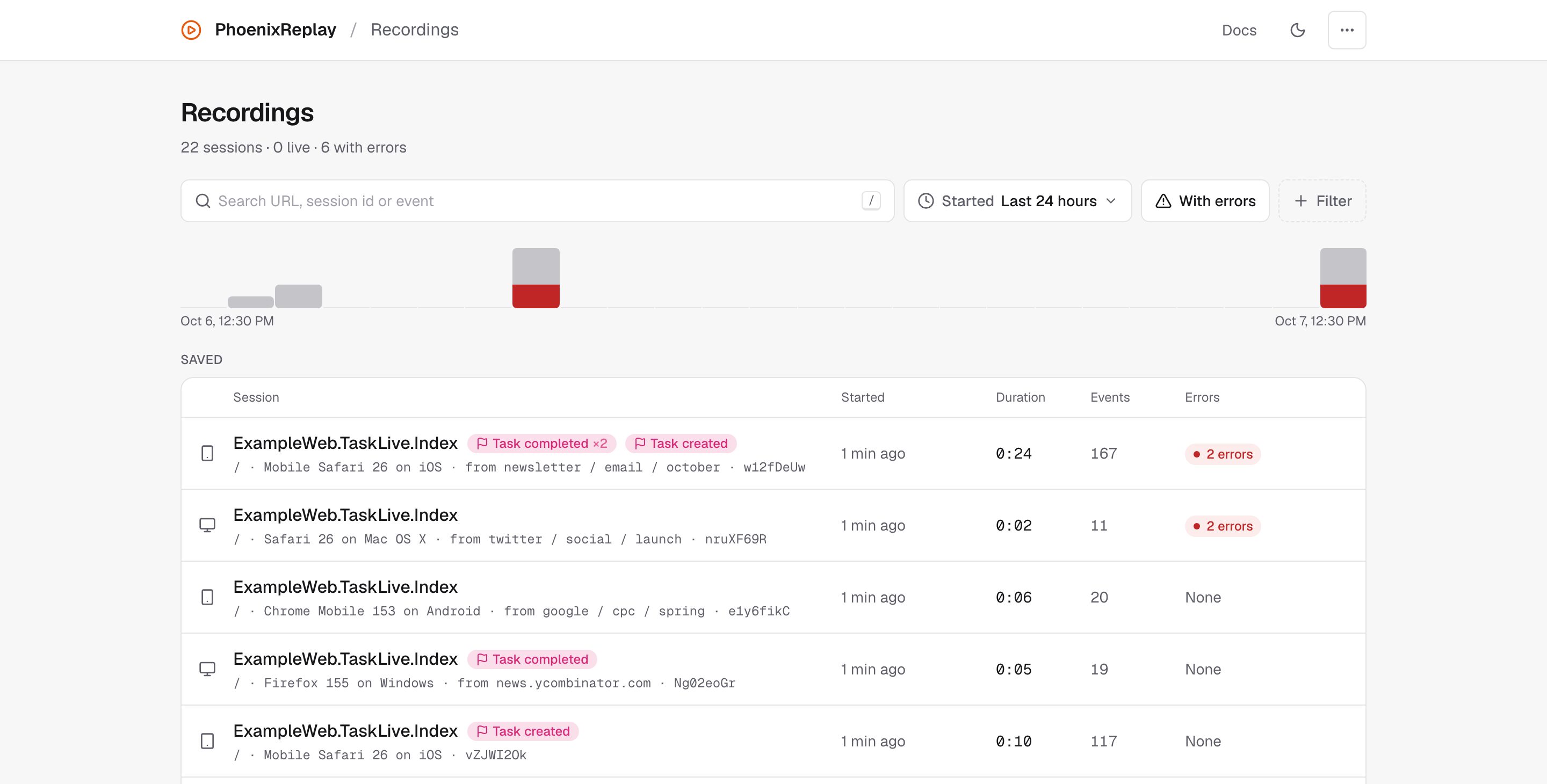
The dashboard needs nothing from your asset pipeline. See the [Dashboard guide](https://hexdocs.pm/phoenix_replay/dashboard.html).
Export a recording as an MP4, from the player or with `mix phoenix_replay.export <id>`. It needs `ffmpeg` and the optional [`playwright_ex`](https://hexdocs.pm/playwright_ex) and [`muontrap`](https://hexdocs.pm/muontrap) dependencies; see [Exporting videos](https://hexdocs.pm/phoenix_replay/dashboard.html#exporting-videos).
## For coding agents
`PhoenixReplay.Trace` reads recordings as plain data from IEx, tests and scripts, and `mix phoenix_replay.list` and `mix phoenix_replay.show` do the same from a shell.
The package ships two agent skills, `phoenix-replay-setup` and `phoenix-replay-debugging`, as `SKILL.md` files in `deps/phoenix_replay/skills/`. Point your agent at them, or copy them to wherever it reads skills from.
## Storage
Recordings are kept in compressed files by default, or in your database:
```elixir
config :phoenix_replay,
storage: {PhoenixReplay.Storage.Ecto, repo: MyApp.Repo},
retention: [max_age: :timer.hours(24 * 7), max_count: 1_000]
```
See the [Storage guide](https://hexdocs.pm/phoenix_replay/storage.html) and the [Configuration cheatsheet](https://hexdocs.pm/phoenix_replay/configuration.html).
## Example app
A Phoenix app with recording and the dashboard wired up lives in `example/`:
```bash
cd example
mix setup
mix phx.server
```
## Documentation
Full documentation, guides and cheatsheets are available on [HexDocs](https://hexdocs.pm/phoenix_replay).
## Development
```bash
mix deps.get
npm ci
npx playwright install chromium
mix assets.build
mix ci
```
`mix ci` runs every check, including the video export tests, which film real replays with Chromium and need `ffmpeg`. A plain `mix test` leaves those out; set `PHOENIX_REPLAY_EXPORT_TESTS=1` to run them with it.
The Ecto storage tests run on SQLite, on DuckDB through [QuackDB](https://hexdocs.pm/quackdb) (Elixir 1.19+; install its binary once with `MIX_ENV=test mix quackdb.install`), and on PostgreSQL when `PHOENIX_REPLAY_POSTGRES_URL` names a database.
## Part of Elixir Vibe
PhoenixReplay is one building block of a larger stack — tools that make AI-generated software checkable: structural search, dependence analysis, duplication and slop detection, session replay, and ecosystem-wide code search. See the [Elixir Vibe](https://github.com/elixir-vibe) organization for the rest, and [Building Blocks for the Future Web](https://github.com/elixir-vibe/building-blocks) for the thesis, architecture, and roadmap that tie them together.
## License
MIT © 2026 Danila Poyarkov