Current section
Files
Jump to
Current section
Files
phoenix_replay
README.md
README.md
# PhoenixReplay 📹
[](https://hex.pm/packages/phoenix_replay) [](https://hexdocs.pm/phoenix_replay)
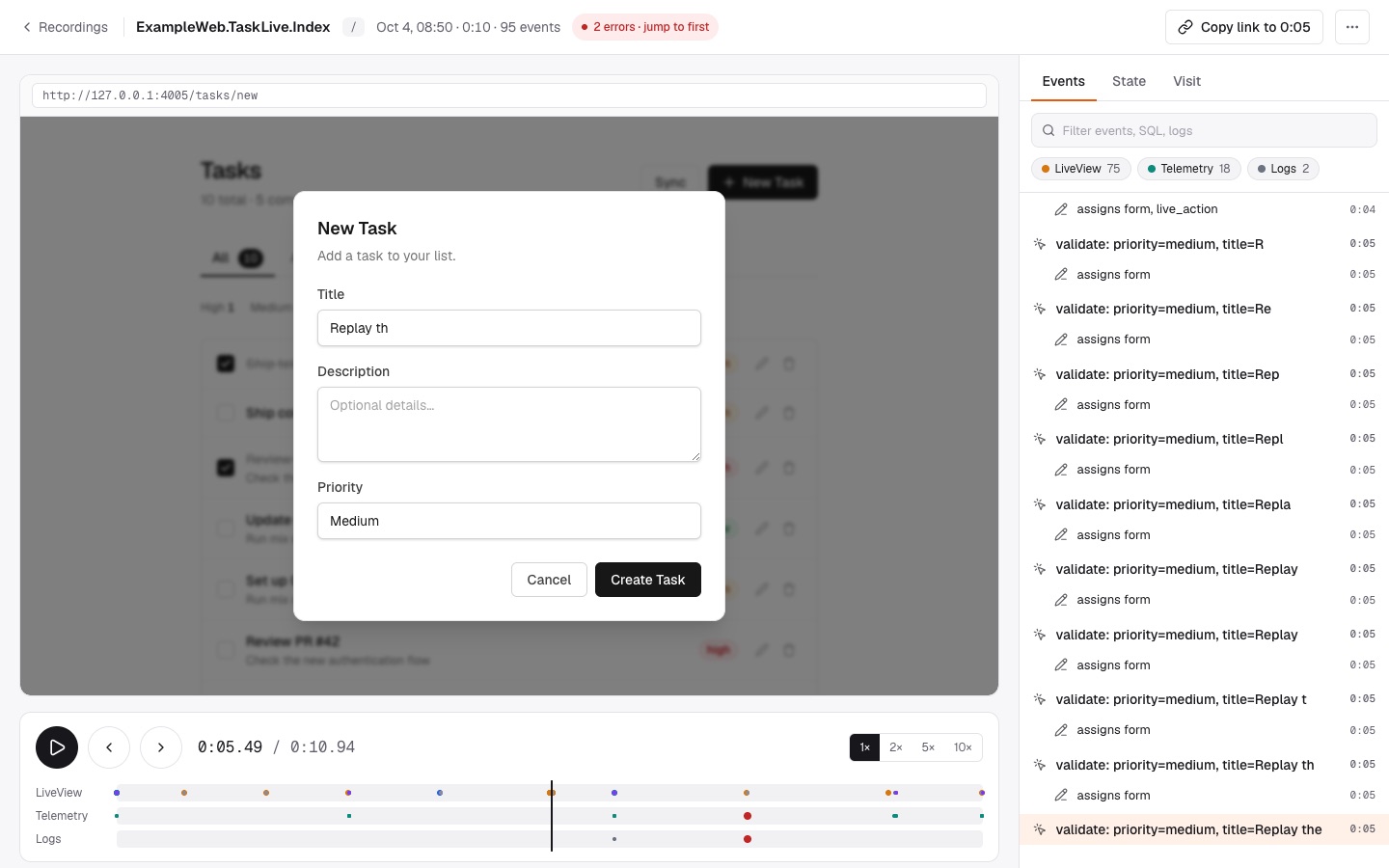
Session recording and replay for Phoenix LiveView. PhoenixReplay records what your LiveViews and LiveComponents did — events, navigation and assigns — and replays a session by re-rendering your own templates with the recorded assigns. No browser recording script, no DOM snapshots.
```bash
mix igniter.install phoenix_replay
```
The installer mounts the dashboard at `/dev/replay` in development. Record a live session:
```elixir
live_session :default, on_mount: [PhoenixReplay.Recorder] do
live "/checkout", CheckoutLive
end
```
Use your app, then open `/dev/replay`. To use the dashboard in production, mount it behind your own authentication:
```elixir
scope "/admin" do
pipe_through [:browser, :require_admin]
phoenix_replay "/replay"
end
```
## Why PhoenixReplay
Browser session recorders capture the DOM and ship every keystroke from the client. A LiveView already knows its state: its template is a function of its assigns. PhoenixReplay records assigns on the server, where they are produced, and replays them through the same template — so a replay shows exactly what the server rendered, a 30-second form session takes a few kilobytes, and nothing changes in your JavaScript.
See [Why PhoenixReplay](https://hexdocs.pm/phoenix_replay/why-phoenix-replay.html) and [How It Works](https://hexdocs.pm/phoenix_replay/how-it-works.html).
## Recording
Every connected LiveView in the live session is recorded, along with its LiveComponents — without changes to your views or components. Sessions without user interaction are discarded. Sample a share of sessions or tune limits per live session:
```elixir
live_session :checkout,
on_mount: [{PhoenixReplay.Recorder, sample_rate: 0.1, max_events: 2_000}] do
live "/checkout", CheckoutLive
end
```
Optionally, the browser sends its viewport, user agent and tab, so a phone session replays at phone size and sessions across LiveViews link into one journey:
```javascript
import { replayParams, replayMetadata } from "phoenix_replay"
new LiveSocket("/live", Socket, {
params: () => ({_csrf_token: csrfToken, ...replayParams()}),
metadata: replayMetadata
})
```
See the [Recording guide](https://hexdocs.pm/phoenix_replay/recording.html) and [LiveComponents guide](https://hexdocs.pm/phoenix_replay/live-components.html).
## Telemetry and logs
See the queries, HTTP calls and log messages behind each click, listed under the event that caused them — including those from `start_async` and `assign_async` tasks:
```elixir
config :phoenix_replay,
collect: [{PhoenixReplay.Collector.Ecto, repo: MyApp.Repo}, PhoenixReplay.Collector.Finch],
logs: [level: :info]
```
Then record every session and keep the ones that matter — every session with an error or a slow query, and a sample of the rest:
```elixir
config :phoenix_replay,
keep: [rate: 0.05, errors: true, slower_than: 1_000],
max_memory: 256 * 1024 * 1024
```
Any telemetry event can be collected, and collectors are a small behaviour. See the [Telemetry and Logs guide](https://hexdocs.pm/phoenix_replay/telemetry-and-logs.html).
## Privacy
Values of keys such as `password`, `token` and `secret` are replaced with `"[FILTERED]"` before anything is stored, through structs, changesets and forms. Plug in your own sanitizer to drop more:
```elixir
defmodule MyApp.ReplaySanitizer do
@behaviour PhoenixReplay.Sanitizer
@impl true
def sanitize_assigns(assigns) do
assigns |> Map.drop([:current_user]) |> PhoenixReplay.Sanitizer.Default.sanitize_assigns()
end
@impl true
defdelegate sanitize_params(params), to: PhoenixReplay.Sanitizer.Default
end
```
Values that only detection can find, such as an email address typed into a form or a card number in a log message, are masked when a session is saved, off your users' path. Use your own patterns or [Obscura](https://hexdocs.pm/obscura), an optional dependency:
```elixir
config :phoenix_replay, redact: {PhoenixReplay.Redactor.Obscura, []}
```
See the [Privacy and Security guide](https://hexdocs.pm/phoenix_replay/privacy-and-security.html).
## Dashboard
Browse, filter and replay recordings in a dashboard that follows your system's light or dark mode. The list pages through storage and holds its place while new sessions arrive; filters live in the URL, so `/admin/replay?event=checkout&within=24h` is a shareable link. The player has a timeline lane per kind of event, the events grouped by the interaction that caused them, the assigns at every moment, and a link to the moment you are looking at. Restrict who sees what with an authorization module:
```elixir
phoenix_replay "/replay",
on_mount: [{MyAppWeb.UserAuth, :ensure_admin}],
authorize: MyApp.ReplayAuthorization
```
The dashboard ships its own assets and loads your app's own Phoenix and LiveView clients, so it needs nothing from your asset pipeline. See the [Dashboard guide](https://hexdocs.pm/phoenix_replay/dashboard.html).
## Storage
Recordings are kept in compressed files by default, or in your database:
```elixir
config :phoenix_replay,
storage: {PhoenixReplay.Storage.Ecto, repo: MyApp.Repo},
retention: [max_age: :timer.hours(24 * 7), max_count: 1_000]
```
See the [Storage guide](https://hexdocs.pm/phoenix_replay/storage.html) and the [Configuration cheatsheet](https://hexdocs.pm/phoenix_replay/configuration.html).
## Example app
A Phoenix app with recording and the dashboard wired up lives in `example/`:
```bash
cd example
mix setup
mix phx.server
```
## Documentation
Full documentation, guides and cheatsheets are available on [HexDocs](https://hexdocs.pm/phoenix_replay).
## Development
```bash
mix deps.get
npm ci
npx playwright install chromium
mix assets.build
mix ci
```
The Ecto storage tests run on SQLite, on DuckDB through [QuackDB](https://hexdocs.pm/quackdb) (Elixir 1.19+; install its binary once with `MIX_ENV=test mix quackdb.install`), and on PostgreSQL when `PHOENIX_REPLAY_POSTGRES_URL` names a database. Any PostgreSQL works; without Docker or Homebrew, [theseus-rs/postgresql-binaries](https://github.com/theseus-rs/postgresql-binaries) has plain builds:
```bash
curl -sL https://github.com/theseus-rs/postgresql-binaries/releases/download/18.6.0/postgresql-18.6.0-aarch64-apple-darwin.tar.gz | tar xz -C _build
pg=_build/postgresql-18.6.0-aarch64-apple-darwin/bin
$pg/initdb -D _build/pgdata -U postgres --auth=trust
$pg/pg_ctl -D _build/pgdata -o "-p 54330 -k /tmp" -l _build/pg.log start
PHOENIX_REPLAY_POSTGRES_URL=postgres://postgres@127.0.0.1:54330/phoenix_replay_test mix test
```
## Part of Elixir Vibe
PhoenixReplay records LiveView sessions as assigns timelines, making every session replayable and every bug reproducible.
It is one building block of a larger stack — tools that make AI-generated
software checkable: structural search, dependence analysis, duplication and
slop detection, session replay, and ecosystem-wide code search. See the
[Elixir Vibe](https://github.com/elixir-vibe) organization for the rest, and
[Building Blocks for the Future Web](https://github.com/elixir-vibe/building-blocks)
for the thesis, architecture, and roadmap that tie them together.
## License
MIT © 2026 Danila Poyarkov