Packages
mailslurp
15.12.13
15.17.22
15.17.21
15.17.17
15.17.16
15.17.15
15.17.14
15.17.13
15.17.12
15.17.11
15.17.10
15.17.9
15.17.8
15.17.7
15.17.6
15.17.5
15.17.4
15.17.3
15.17.2
15.17.1
15.17.0
15.16.22
15.16.21
15.16.20
15.16.19
15.16.18
15.16.17
15.16.16
15.16.15
15.16.14
15.16.13
15.16.12
15.16.11
15.16.10
15.16.9
15.16.8
15.16.7
15.16.6
15.16.5
15.16.4
15.16.3
15.16.2
15.16.1
15.16.0
15.15.5
15.15.4
15.15.2
15.15.1
15.14.0
15.13.32
15.13.31
15.13.30
15.13.29
15.13.28
15.13.27
15.13.26
15.13.25
15.13.24
15.13.23
15.13.22
15.13.21
15.13.20
15.13.19
15.13.18
15.13.17
15.13.16
15.13.15
15.13.14
15.13.13
15.13.11
15.13.10
15.13.9
15.13.8
15.13.7
15.13.6
15.13.5
15.13.4
15.13.3
15.13.2
15.13.1
15.13.0
15.12.17
15.12.16
15.12.15
15.12.14
15.12.13
15.12.12
15.12.11
15.12.3
15.12.2
15.12.1
15.12.0
15.11.1
15.11.0
15.9.0
15.8.1
15.8.0
15.7.17
15.7.16
15.7.15
15.7.14
15.7.13
15.7.12
15.7.10
15.7.8
15.7.7
15.7.5
15.7.4
15.7.1
15.7.0
15.6.0
15.5.6
15.5.5
15.5.4
15.5.3
15.5.2
15.5.1
15.5.0
15.4.2
15.4.1
15.4.0
15.3.1
15.3.0
15.2.8
15.2.7
15.2.6
15.2.5
15.2.4
15.2.2
15.2.1
15.2.0
15.1.4
15.1.3
15.1.2
15.1.1
15.1.0
15.0.3
15.0.2
15.0.1
15.0.0
14.0.6
14.0.5
14.0.3
14.0.2
14.0.1
14.0.0
13.1.0
13.0.1
13.0.0
12.8.4
12.8.3
12.8.2
12.8.1
12.8.0
12.7.1
12.7.0
12.6.4
12.6.3
12.6.1
12.6.0
12.5.0
12.4.8
12.4.7
12.4.6
12.4.5
12.4.4
12.4.2
12.4.1
12.4.0
12.3.333
12.3.2
12.3.1
12.3.0
12.2.2
12.2.1
12.2.0
12.1.3333
12.1.32
12.1.31
12.1.30
12.1.29
12.1.28
12.1.27
12.1.26
12.1.25
12.1.24
12.1.23
12.1.22
12.1.1
12.1.0
12.0.0
11.16666.0
11.15.0
11.14.0
11.13.0
11.12.0
11.11.1
11.11.0
11.10.3
11.10.2
11.10.1
11.10.0
11.9.7
11.9.6
11.9.4
11.9.3
11.9.2
11.9.1
11.9.0
11.8.13
11.8.12
11.8.11
11.8.10
11.8.9
11.8.8
11.8.6
11.8.5
11.8.4
11.8.3
11.8.2
11.8.1
11.8.0
11.7.509
11.7.508
11.7.506
11.7.505
11.7.502
11.7.501
11.7.500
11.7.400
11.7.314
11.7.313
11.7.312
11.7.311
11.7.310
11.7.309
11.7.308
11.7.307
11.7.306
11.7.304
11.7.302
11.7.301
11.7.300
11.7.215
11.7.214
11.7.213
11.7.212
11.7.211
11.7.210
11.7.203
11.7.202
11.7.201
11.7.200
11.7.122
11.7.11
11.7.10
11.7.9
11.7.8
11.7.7
11.7.6
11.7.5
11.7.4
11.7.2
11.7.1
11.7.0
11.6.24
11.6.23
11.6.22
11.6.21
11.6.20
11.6.19
11.6.18
11.6.16
11.6.15
11.6.14
11.6.13
11.6.12
11.6.11
11.6.10
11.6.9
11.6.8
11.6.7
11.6.6
11.6.5
11.6.4
11.6.3
11.6.2
11.6.1
11.5.2333
Elixir Email API for MailSlurp
Current section
Files
Jump to
Current section
Files
README.md
# Elixir MailSlurp Library
Official Elixir library for MailSlurp. Create email accounts then send and receive email from Elixir, Erlang, Phoenix and more.
## Quick links
- [Hex Package](https://hex.pm/packages/mailslurp)
- [Hex Docs](https://hexdocs.pm/mailslurp/)
- [GitHub Source](https://github.com/mailslurp/mailslurp-client-elixir)
- [Documentation](https://docs.mailslurp.com/elixir/)
## Install
There are multiple ways to install MailSlurp.
> **Note:** replace the version shown with the [latest version on hex.pm](https://hex.pm/packages/mailslurp).
### Mix.exs
```elixir
{:mailslurp, "~> 11.6"}
```
### Rebar.config
```text
{mailslurp, "11.6.0"}
```
### Erlang.mk
```text
dep_mailslurp = hex 11.6.0
```
### Recommended extras
MailSlurp uses Tesla client and httpc by default. Hackney is recommended as it handles some MailSlurp POST methods with empty bodies.
```elixir
defp deps do
[
{:hackney, "~> 1.17.4"},
{:mailslurp, "~> 11.6.1"}
]
end
```
## Configure client
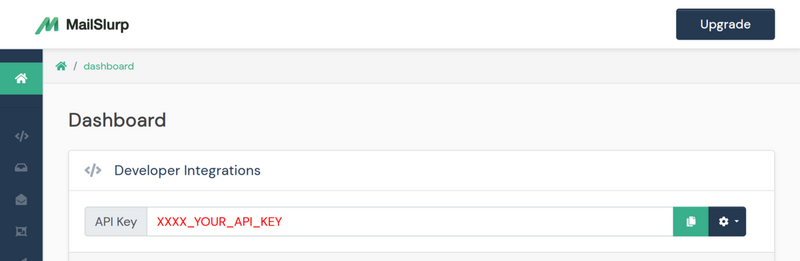
### Get API KEY
Create a [MailSlurp account](https://app.mailslurp.com/login/) to obtain a free API KEY.
### Configure Tesla
The MailSlurp REST API is split into controllers. Each method accepts a Tesla client as the first parameter.
```elixir
# create a tesla client for MailSlurp controllers
middleware = [
# set x-api-key header with MailSlurp API Key
{Tesla.Middleware.Headers, [{"x-api-key", "your-mailslurp-api-key-here"}]},
{Tesla.Middleware.BaseUrl, "https://api.mailslurp.com"},
{Tesla.Middleware.EncodeJson, engine: Poison}
]
# use hackney adapter instead of httpc
adapter = {Tesla.Adapter.Hackney, [recv_timeout: 30_000]}
# create a connection
connection = Tesla.client(middleware, adapter)
```
### Use controllers
Controller method return values can be matched against `:ok, T` or `:error, :info`.
```elixir
# handle ok result and response
{ :ok, inbox } = MailSlurpAPI.Api.InboxController.create_inbox(connection)
# handle error
{ :error, info } = MailSlurpAPI.Api.InboxController.create_inbox(connection)
```
## Examples
Here are some common use cases. See the [documentation](https://docs.mailslurp.com/elixir/) or [examples](https://www.mailslurp.com/tags/elixir/) pages for more information.
### Create inbox
Inboxes have an `emailAddress` and `id`.
```elixir
# create test email address
{ :ok, inbox } = MailSlurpAPI.Api.InboxController.create_inbox(connection)
assert inbox.emailAddress =~ "@mailslurp."
```
### Receive email
```elixir
{:ok, email} = MailSlurpAPI.Api.WaitForController.wait_for_latest_email(connection, [
:inboxId = inbox.id,
:timeout = 30_000,
:unreadOnly = true
])
```
### Send email
```elixir
MailSlurpAPI.Api.InboxController.send_email(connection, inbox.id, [
to: [inbox.emailAddress],
subject: "test",
body: "Hello"
])
```