Current section
Files
Jump to
Current section
Files
README.md
# Leaf
Visual WYSIWYG + Obsidian-style hybrid live preview + markdown editor for Phoenix LiveView.
**[Live Demo](https://sasha.don.ee/demo/leaf)**
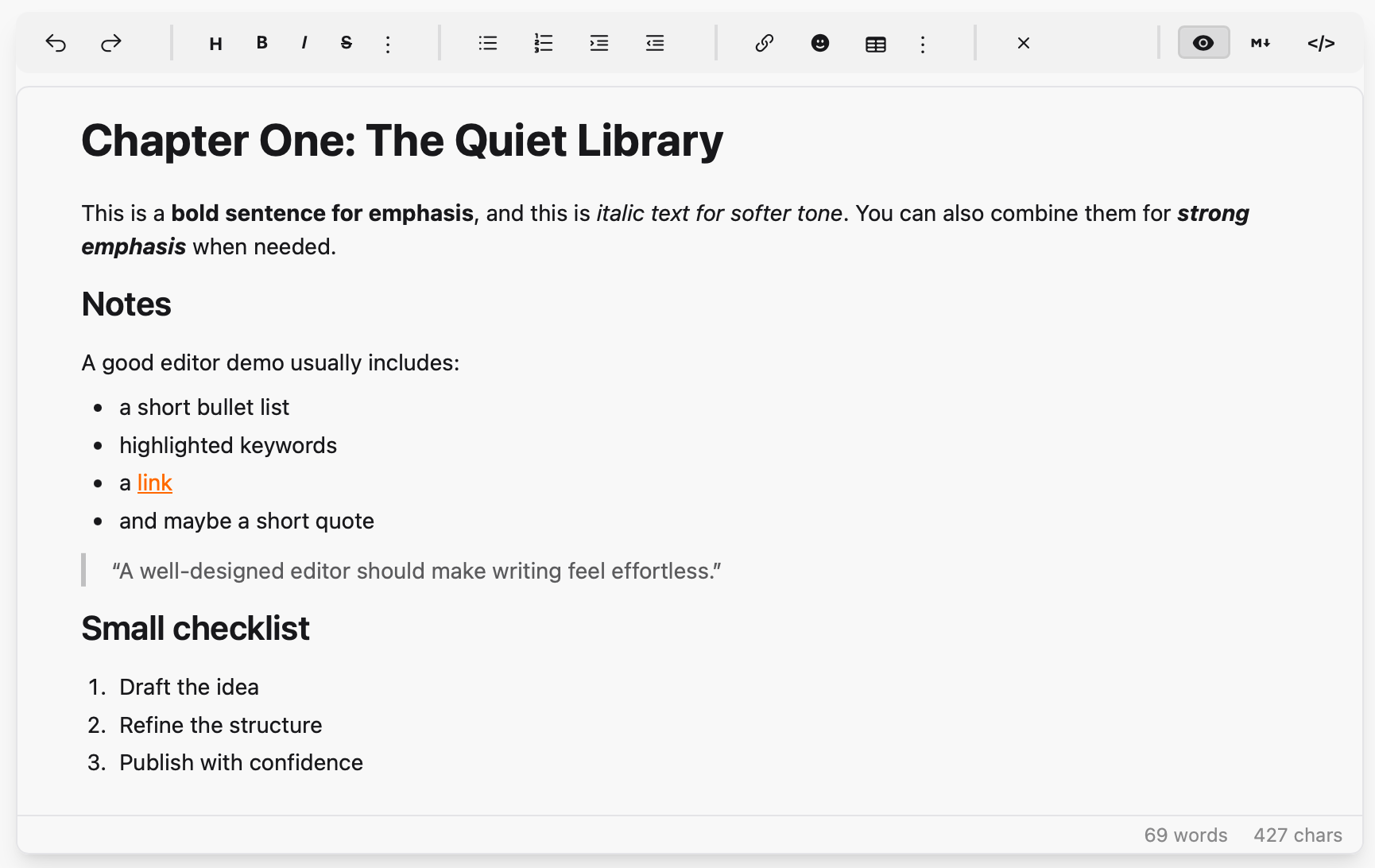
- **Visual mode**: contenteditable div with toolbar formatting (bold, italic, headings, lists, links, code blocks, tables, blockquotes, inline spoilers, etc.)
- **Hybrid mode** (Obsidian-style live preview): formatting renders inline (bold, italic, strike, code, spoiler, headings, horizontal rule, lists) while the source markers stay editable — typing `**word**`, `*word*`, `~~word~~`, `||word||`, `` `word` ``, `# heading`, `---`, `- item`, or `1. item` auto-formats on the closing delimiter, and the markers fade in/out as the cursor enters and leaves each formatted run
- **Markdown mode**: plain textarea with toolbar support
- **HTML mode**: raw HTML editing for power users
- **Responsive toolbar**: compact, stationary controls for narrow embeds and mobile comment editors; advanced tools progressively move into menus instead of requiring horizontal scrolling
- **Drag-and-drop reordering**: drag any block element (headings, paragraphs, lists, images, blockquotes, code blocks) to rearrange content
- **Resizable**: drag the bottom-right grip to change height; double-click the grip to auto-fit to content
- **Spoilers**: Discord-style `||hidden||` markdown that renders as a click-to-reveal censored block in published content
- Content syncs between modes via [Earmark](https://hex.pm/packages/earmark) and client-side HTML→Markdown conversion
- No npm dependencies — vendored JS bundle
## Installation
Add `leaf` to your dependencies in `mix.exs`:
```elixir
def deps do
[
{:leaf, "~> 0.5"}
]
end
```
### JavaScript Setup
In your `app.js`, import the JS and register the hook:
```javascript
import "../../../deps/leaf/priv/static/assets/leaf.js"
let liveSocket = new LiveSocket("/live", Socket, {
hooks: {
Leaf: window.LeafHooks.Leaf,
// ... your other hooks
}
})
```
#### CDN Alternative
If you prefer not to use the `deps/` import path (e.g., non-standard project structure), you can load the JS from CDN instead:
```javascript
// Load Leaf from CDN
const script = document.createElement("script");
script.src = "https://cdn.jsdelivr.net/gh/alexdont/leaf@v0.5.0/priv/static/assets/leaf.js";
script.onload = () => {
// Leaf is now available at window.LeafHooks
};
document.head.appendChild(script);
```
> [!IMPORTANT]
> A CDN pin (or a vendored copy of `leaf.js`) has to move in lockstep with
> the hex dependency. The editor renders identically either way, so a bundle
> left behind is otherwise silent — it just quietly stops implementing things
> the server expects. Leaf compares `window.LeafHooks.version` against the
> library version on mount and warns in the console when they disagree.
### Peer Requirements
Leaf's toolbar uses [Tailwind CSS](https://tailwindcss.com/) + [daisyUI](https://daisyui.com/) classes (`btn`, `btn-xs`, `divider`, `textarea`, etc.) and [Heroicons](https://heroicons.com/) CSS classes (`hero-*`). Make sure these are available in your project.
## Usage
First, import the component in your view helpers (e.g., in `my_app_web.ex`):
```elixir
import Leaf, only: [leaf_editor: 1]
```
Then use it in your templates:
```heex
<.leaf_editor
id="my-editor"
content={@content}
mode={:visual}
toolbar={[:image, :video]}
deny={[:links, :images, :markdown_mode]}
placeholder="Write something..."
readonly={false}
height="480px"
debounce={400}
/>
```
<details>
<summary>Alternative: direct LiveComponent syntax</summary>
```heex
<.live_component
module={Leaf}
id="my-editor"
content={@content}
mode={:visual}
toolbar={[:image, :video]}
deny={[:links, :images, :markdown_mode]}
placeholder="Write something..."
readonly={false}
height="480px"
debounce={400}
/>
```
</details>
### Assigns
| Assign | Type | Default | Description |
|---|---|---|---|
| `id` | string | required | Unique editor ID |
| `content` | string | `""` | Markdown content |
| `mode` | `:hybrid` \| `:visual` \| `:markdown` \| `:html` | `:hybrid` | Initial editor mode |
| `preset` | `:advanced` \| `:simple` | `:advanced` | Toolbar preset; `:simple` is a compact subset for comments and lightweight editing |
| `toolbar` | list | `[]` | Extra toolbar buttons (`:image`, `:video`) |
| `deny` | list | `[]` | Disallowed features (`:links`, `:images`, `:video`, `:visual_mode`, `:hybrid_mode`, `:markdown_mode`, `:html_mode`); denied controls are hidden from the UI — see [Denying features](#denying-features) |
| `preserve_tags` | list | `[]` | Custom component tag names to protect from the HTML round-trip — **required** for content using them, see [Custom component tags](#custom-component-tags) |
| `toolbar_extra` | list | `[]` | Host-defined toolbar buttons — see [Host toolbar buttons](#host-toolbar-buttons) |
| `placeholder` | string | `"Write something..."` | Placeholder text shown when the editor is empty |
| `readonly` | boolean | `false` | Read-only mode |
| `height` | string | `"480px"` | Editor height (the body resizes from this baseline) |
| `debounce` | integer | `400` | Debounce interval in ms for content-change events |
| `loading_preset` | atom | `:random` | Pre-mount loading label preset: `:random` picks from `:unpuzzling`, `:brewing`, `:polishing`, `:composing`, `:crafting`, `:tidying`. `:default` shows plain `"Loading…"` |
| `loading_text` | string | `nil` | Custom loading label; takes precedence over `loading_preset` when set |
| `upload_handler` | any | `nil` | Hint that the consumer supports uploads. When set, the main image button asks the parent for an upload via `:leaf_insert_request`; when `nil`, it opens the by-URL dialog directly |
| `suggestions` | list | `[]` | Inline-suggestion trigger configs — see [Inline suggestions](#inline-suggestions) |
| `class` | string | `nil` | Extra classes for the wrapper |
| `script_nonce` | string | `""` | CSP nonce applied to the inline `<style>` block and the bundle-check `<script>` |
| `bundle_check` | boolean | `true` | Emit the inline `<script>` that reports a JS hook that never attached. Set `false` under a CSP that forbids inline scripts and cannot supply a nonce — it is a diagnostic, nothing depends on it |
### Custom component tags
> [!IMPORTANT]
> Content that uses custom tags — `<Hero />`, `<Showcase>…</Showcase>` —
> **must** declare them in `preserve_tags`. Without it the visual and hybrid
> surfaces flatten each one into loose paragraphs on the first keystroke, and
> autosave writes that back over the original. Leaf logs a warning naming any
> undeclared PascalCase tag it sees, but only the declaration protects the
> content.
```heex
<.leaf_editor
id="post-editor"
content={@content}
preserve_tags={["Hero", "Showcase", "Note", "Audio", "EntityForm"]}
/>
```
A declared tag is pulled out before the markdown parser runs, rendered as a
non-editable **atomic block** and restored verbatim on the way back, so the
source round-trips byte for byte.
The block is not opaque — it shows the tag name, its attributes, a thumbnail
for any image-ish attribute (`image`, `poster`, `cover`, an image `src`, …) and
its children rendered as formatted text, so links and emphasis inside
`<Header>…</Header>` are visible while you write. **Double-click** a block to
edit its raw source in place; ⌘/Ctrl+Enter or Save commits, Escape cancels.
Silence the warning (e.g. for content that legitimately contains prose like
`<Not A Tag>`) with `config :leaf, warn_unpreserved_tags: false`.
### Denying features
`deny` removes affordances entirely — the markup is never rendered and the
matching client paths refuse to act, so it is one rule rather than a default a
stray click can talk its way past.
| Atom | Effect |
|---|---|
| `:links` | No link button; `<a>` / `[…](…)` stripped from content |
| `:images` | No image button; `<img>` / `` stripped from content |
| `:video` | No video button |
| `:visual_mode` / `:hybrid_mode` / `:markdown_mode` / `:html_mode` | That mode loses its tab in **every** switcher and refuses a `:set_mode` command |
A host whose documents are built from custom component tags typically wants the
markdown surface only — the visual surfaces can't edit an atomic block's source
anyway:
```heex
<.leaf_editor id="content-editor" mode={:markdown}
deny={[:visual_mode, :hybrid_mode]} … />
```
Denying the mode you also passed as `mode` falls back to the first allowed mode
(`:hybrid`, `:visual`, `:markdown`, `:html` order). Denying *every* mode raises.
When only one mode survives, the switcher is hidden rather than rendered as a
single dead tab.
### Host toolbar buttons
`toolbar_extra` adds your own buttons; each click sends
`{:leaf_toolbar_action, %{editor_id, id, selection}}`.
```heex
<.leaf_editor
id="post-editor"
content={@content}
toolbar_extra={[
%{id: "showcase", label: "Showcase", title: "Insert a showcase", collapse: false},
%{id: "footnote", label: "Footnote"}
]}
/>
```
| Key | Meaning |
|---|---|
| `:id` | Required; echoed back in the message |
| `:label` / `:title` | Button text / tooltip |
| `:icon` | **Rendered as raw markup** so an inline `<svg>` works. That makes it trusted HTML — never build it from user-influenced input |
| `:glyph` | Name of a bundled icon, used in the overflow menus |
| `:class` | Extra classes on the button |
| `:collapse` | `false` pins the button to the main toolbar row instead of letting it fold into the "More" menu when the toolbar gets narrow |
Use `collapse: false` for the actions your documents are actually built from —
buried under "More" they are barely more discoverable than typing the tag by
hand, which is the problem they existed to solve.
### Inline suggestions
The editor can offer a popup as the writer types a trigger character — `#` for
tags, `@` for people, `/` for components, `:` for emoji. It knows nothing about
any of those: it detects a configured trigger, asks the host what matches,
renders the list and inserts the pick. Works in all four modes.
```heex
<.leaf_editor
id="post-editor"
content={@content}
suggestions={[
%{
trigger: "#",
boundary: :word_start,
token: ~r/[\p{L}\p{N}_-]/u,
first_char: ~r/\p{L}/u,
max_length: 30,
allow_create: true,
insert_suffix: " ",
label: "Tags"
}
]}
/>
```
```elixir
def handle_info({:leaf_suggest, %{editor_id: id, trigger: "#", query: q, seq: seq}}, socket) do
results =
Enum.map(my_tag_source(q), fn tag ->
%{value: tag.name, label: "##{tag.name}", sublabel: "#{tag.count} posts", icon: "hero-hashtag"}
end)
send_update(Leaf, id: id, action: :suggestions, trigger: "#", query: q, seq: seq, results: results)
{:noreply, socket}
end
```
Every config key but `:trigger` is optional; keys may be atoms or strings.
`:boundary` (`:word_start` / `:line_start` / `:not_line_start` / `:any`),
`:token`, `:first_char`, `:min_chars`, `:max_length`, `:debounce`,
`:max_results`, `:allow_create`, `:keep_trigger`, `:insert_suffix`, `:label`
and `:exclude` are documented in full in the `Leaf` moduledoc.
`:not_line_start` exists for `#`, where the first column is already spoken for:
`# ` opens a heading and `#tag` mid-line opens the popup, with no keystroke
where both are live.
Configuring a `#` trigger also tells Leaf that `#` means "tag" here, so
hashtags render as tinted, slightly-italic tokens in the visual and hybrid
surfaces instead of reading as ordinary prose. It is purely a decoration — the
markdown stays `#tag`. An editor with no `#` trigger gets no hashtag styling,
so a document using `#` for issue numbers is left alone.
Two rules matter more than the shape: **echo `trigger`, `query` and `seq` back
unchanged** so the client can drop replies a later keystroke superseded, and
know that **typing is never blocked** — a host that never answers gets a short
spinner and then the popup closes on its own.
By default the popup stays shut inside fenced/inline code, inside a markdown
link destination (`[jump](#section)`) and after a non-space character (URL
fragments like `/page#section`). ↑/↓ move, Enter and Tab accept, Escape
dismisses; while it is open Enter neither inserts a newline, nor continues a
list, nor submits the surrounding form.
A runnable two-trigger example (`#` tags and `/` components) lives in the
demo app's `HomeLive`.
### Messages to Parent
Handle these in your LiveView's `handle_info/2`:
```elixir
def handle_info({:leaf_changed, %{editor_id: id, markdown: md, html: html}}, socket) do
# Content was updated
{:noreply, assign(socket, :content, md)}
end
def handle_info({:leaf_insert_request, %{editor_id: id, type: :image}}, socket) do
# User clicked the image toolbar button — show your image picker
{:noreply, socket}
end
def handle_info({:leaf_mode_changed, %{editor_id: id, mode: mode}}, socket) do
# Mode switched between :visual and :markdown
{:noreply, socket}
end
def handle_info({:leaf_suggest, %{editor_id: id, trigger: t, query: q, seq: seq}}, socket) do
# Only sent when `suggestions` is configured — see "Inline suggestions"
{:noreply, socket}
end
def handle_info({:leaf_flushed, %{editor_id: id, ref: ref, markdown: md}}, socket) do
# Only sent in answer to `action: :flush, ref: …` — see "Flushing"
{:noreply, socket}
end
```
### Flushing (save before navigate)
`action: :flush` tells the client to push its pending keystrokes immediately.
On its own that reply arrives as an ordinary `{:leaf_changed, …}` —
indistinguishable from the debounce firing — so a host that needs to *await*
the flush (version switch, language switch, translation enqueue) passes a
correlation `ref`:
```elixir
send_update(Leaf, id: "content-editor", action: :flush, ref: "save-42")
def handle_info({:leaf_flushed, %{ref: "save-42", markdown: md}}, socket) do
# every keystroke is in; safe to persist and navigate
end
```
Without a `ref` no `{:leaf_flushed, …}` is sent at all, so existing hosts keep
their exact behaviour.
### Commands from Parent
```elixir
# Insert an image at the cursor position
send_update(Leaf, id: "my-editor", action: :insert_image, url: "https://...", alt: "description")
# Replace all content. Re-baselines the dirty snapshot by default — replacing
# content programmatically is not a user edit, so `protect_navigation` does not
# prompt about work the writer never did. `mark_saved: false` opts out.
send_update(Leaf, id: "my-editor", action: :set_content, content: "# New content")
# Switch mode programmatically (ignored when that mode is denied)
send_update(Leaf, id: "my-editor", action: :set_mode, mode: :markdown)
# Push pending keystrokes; `ref` makes the reply identifiable
send_update(Leaf, id: "my-editor", action: :flush, ref: "save-42")
# Mark the current content as the clean baseline
send_update(Leaf, id: "my-editor", action: :mark_saved)
# Answer a {:leaf_suggest, …} request (echo trigger/query/seq back unchanged)
send_update(Leaf,
id: "my-editor",
action: :suggestions,
trigger: "#",
query: "eli",
seq: 7,
results: [%{value: "elixir", label: "#elixir", sublabel: "12 posts", icon: "hero-hashtag"}]
)
```
## Gettext (optional)
To enable translations for toolbar tooltips:
```elixir
# config/config.exs
config :leaf, :gettext_backend, MyApp.Gettext
```
Without this config, English strings are used as-is.
Leaf's msgids live in a dependency's source, which your `mix gettext.extract`
cannot see — so Leaf ships the catalog template instead. Copy it in and merge:
```bash
cp deps/leaf/priv/gettext/leaf.pot priv/gettext/leaf.pot
mix gettext.merge priv/gettext
```
Then translate `priv/gettext/<locale>/LC_MESSAGES/leaf.po`. Lookups try the
`"leaf"` domain first and fall back to `"default"`, so you can also paste the
msgids into `default.po` and skip the extra domain.
## Checking the JS bundle is present and current
Leaf does not bundle its JS into the host, and an editor whose hook never
attached is indistinguishable from a working one at a glance — it renders, it
looks ordinary, it captures nothing. Two guards:
- If the hook has not attached shortly after paint, the editor logs a console
error naming the likely causes and stays on its loading shimmer rather than
pretending to be an editor. This is Leaf's only inline `<script>`; it takes
`script_nonce` like the inline `<style>` does, and `bundle_check={false}`
turns it off entirely for hosts whose CSP allows neither.
- `window.LeafHooks.version` reports the loaded bundle's version. Leaf compares
it against the library version on mount and warns on a mismatch — which is
what catches a **vendored** copy of `leaf.js` that stayed behind after
`mix deps.update leaf`. `Leaf.js_version/0` exposes the same value server-side.
## License
MIT — see [LICENSE](LICENSE).