Current section
Files
Jump to
Current section
Files
README.md
# ExPilot
A multiplayer XPilot in the terminal, in the browser and on the desktop, on
[Cauldron](https://github.com/jaman/cauldron). Classic block maps, newtonian ships,
thrust and shields and fuel, cannons, wormholes, robots, items — mines, missiles, lasers,
cloaks, ECM, transporters, tractor beams, deflectors, phasing, hyperjumps and the rest —
teams, targets, capture the flag, races, a radar, and music that follows the fight.
[](https://www.youtube.com/watch?v=mCryFL8HUOo)
A tour of the game, with its music, is [on YouTube](https://www.youtube.com/watch?v=mCryFL8HUOo).
```bash
mix ex_pilot.play # this terminal, this machine's speaker
mix ex_pilot.serve --port 2222 # over ssh and in the browser, one process
mix ex_pilot.maps # fetch the 132 classic maps into priv/maps
```
## The lobby
Every map under `priv/maps` is an arena in the lobby — Dogfight is bundled, the rest come
from `mix ex_pilot.maps` — with its size and robot count beside its name (an arena with
none is practice); robots never take every base, one is always left for you. The list
scrolls (`PgUp`/`PgDn`, `Home`/`End`, the wheel); a click chooses a row and a second click
joins it, `Enter` joins, `w` watches, `t` picks a team. An arena's world and robots start
when someone joins it and stop again after two minutes with nobody in it. `h` opens the
guide: everything you can meet in an arena, drawn beside a line on what it does and the
key that uses it.
## Flying
The defaults are WASD with the pointer steering: `a`/`d` turn (and the ship follows the
mouse until a turn key is pressed), `s` or the right mouse button thrust, space or the
left mouse button fire, `w` or left shift shield — a shielded ship shows a ring. Settings
(`s` on the title or in the lobby, `Tab` in the arena) offers arrows and vi presets,
rebinding, pointer steering, effects and music levels, display and frame rate.
A ship sits on its base until it thrusts, and launches away from the wall its base is
on. Held turn keys take over from the pointer until it moves again. A ship that has just
appeared — joined, respawned or at a new round — cannot be hit for three seconds and
shows its shield meanwhile. A tank that has been empty for ten seconds loses the ship,
on the base or off it. Ships that fly into each other crash unless shielded; shielded
ships bounce apart. Walls bounce a ship that touches them slowly or with its shield up —
an unshielded bounce costs fuel — and crash one that hits them faster.
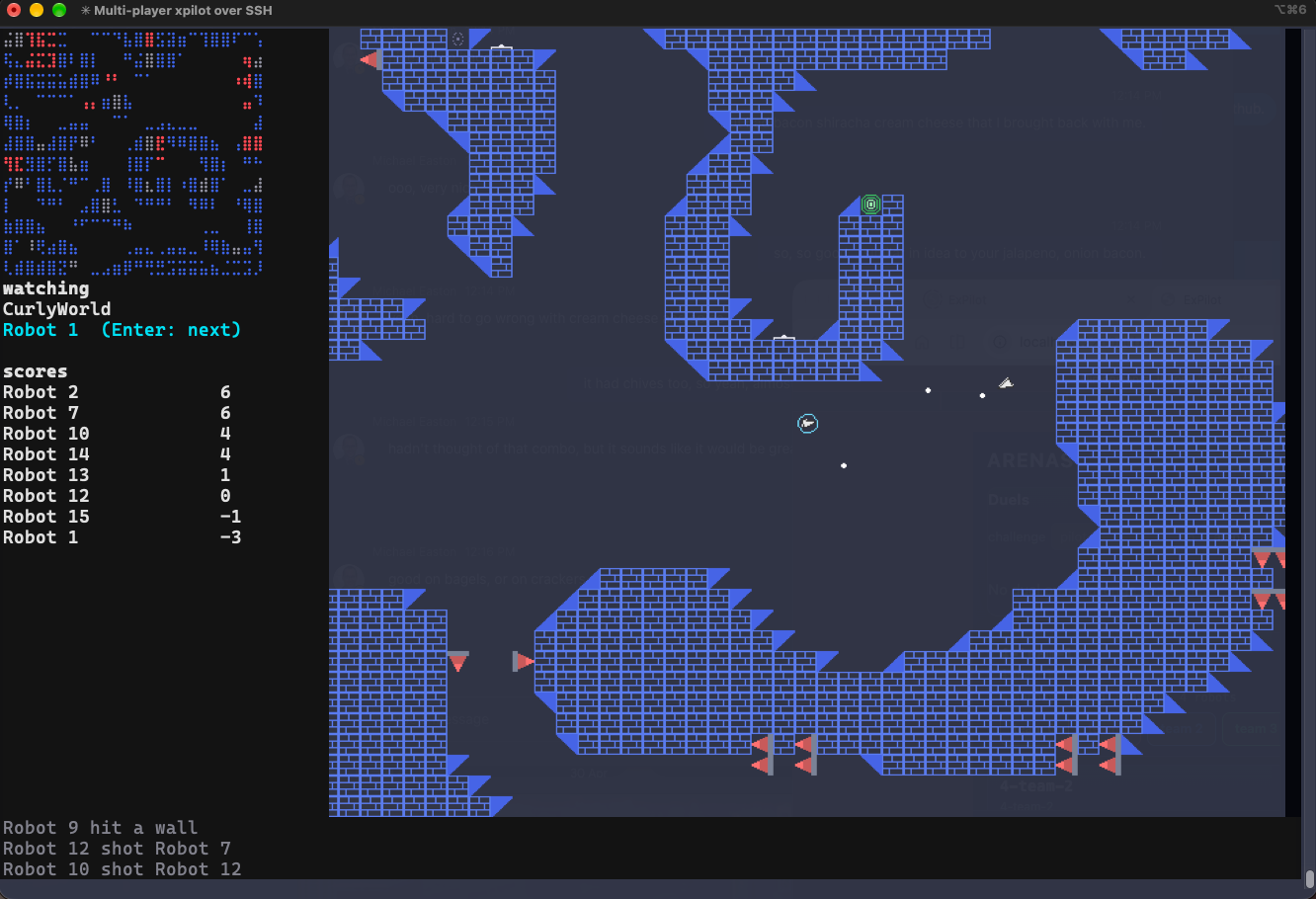
The hud is a column down the left as in XPilot: the radar on top — you in yellow,
teammates blue, enemies red, bases grey — then you, your items and the scores, with the
arena's messages along the bottom; it counts the enemies still in the round. `t` talks to
the arena; `?` shows the keys (tap to keep, hold to peek); `+`/`-` (the wheel, a pinch)
zoom out to the whole arena and back and `0` puts it back; `Esc` or `q` goes back to the
lobby, `^Q` quits.
## Rounds
With limited lives, a ship out of lives watches the nearest ship still flying — `Enter`
steps to the next one, for a spectator too — and the round ends as in XPilot when one
ship (one team) is left standing among two or more (alone in an arena you fly for
practice; nothing is won or lost): it is told it won, everyone is back on their bases four
seconds later, and for you it is a summary — Victory or Defeat with the standings. `Enter`
after a Victory joins the next arena in the list, after a Defeat the same one again; `Esc`
returns to the lobby.
## Robots
Robots launch off their bases, hunt the nearest enemy anywhere in the arena along the
clearest heading toward it, brake off walls, fire within reach and go for a fuel station
when the tank runs low. Each is seated with a skill of its own, drawn at random: the sharp
ones aim tight, fire from far and react in three frames; the dull ones spray, wait for a
closer shot, hesitate on the trigger and think three times slower. A player who finds
every base taken gets a robot's, and the robot comes back when there is room again.
## Items
Items appear on the map and are picked up by flying over them; the hud lists what you
carry. `1` drops a mine, `2` fires a missile (`n` picks torpedo, smart or heat), `3` fires
the laser, `c` cloaks, `e` jams, `r` steals with the transporter, `g`/`b` pull and push
with the tractor beam, `x` deflects, `p` phases through walls, `u` hyperjumps, `[`/`]`
emergency shield and thrust, `o` autopilot, `v` drops the ball.
## Teams, targets, balls and races
On a team map teammates' shots pass through each other, the `!` targets take three hits,
and carrying the other team's ball from its `*` treasure into your own scores: the ball
hangs on a string that tugs the ship and snaps when overstretched, and falls, drifts and
bounces on its own when loose. A race map runs laps over the `A`–`Z` checkpoints. The
music follows the kind of arena — a dogfight, capture the flag, a team battle and a race
each have their own pieces.
## Duels
From the browser's lobby, challenge a pilot on an arena, first to a number of kills: a
private arena appears in every lobby — the two of you fly it, anyone can watch — and
closes when it is won. Watching, the arrows or a drag pan the view, the wheel and a pinch
zoom about the pointer, and `0` recentres it: watch a duel from above, or close in on it.
## Leaders
Every round's result — kills, deaths, whether it was won, the best streak of kills without
dying, the longest contact (seconds alive with an enemy within thirty tiles) — goes to the
boards: today / this week / all time, by kills, kills a death, rounds won, streak, contact
or laps, over every arena or one. `/leaders` in the browser, `l` in the terminal and on
the desktop. Robots' results are not kept.
## In the browser
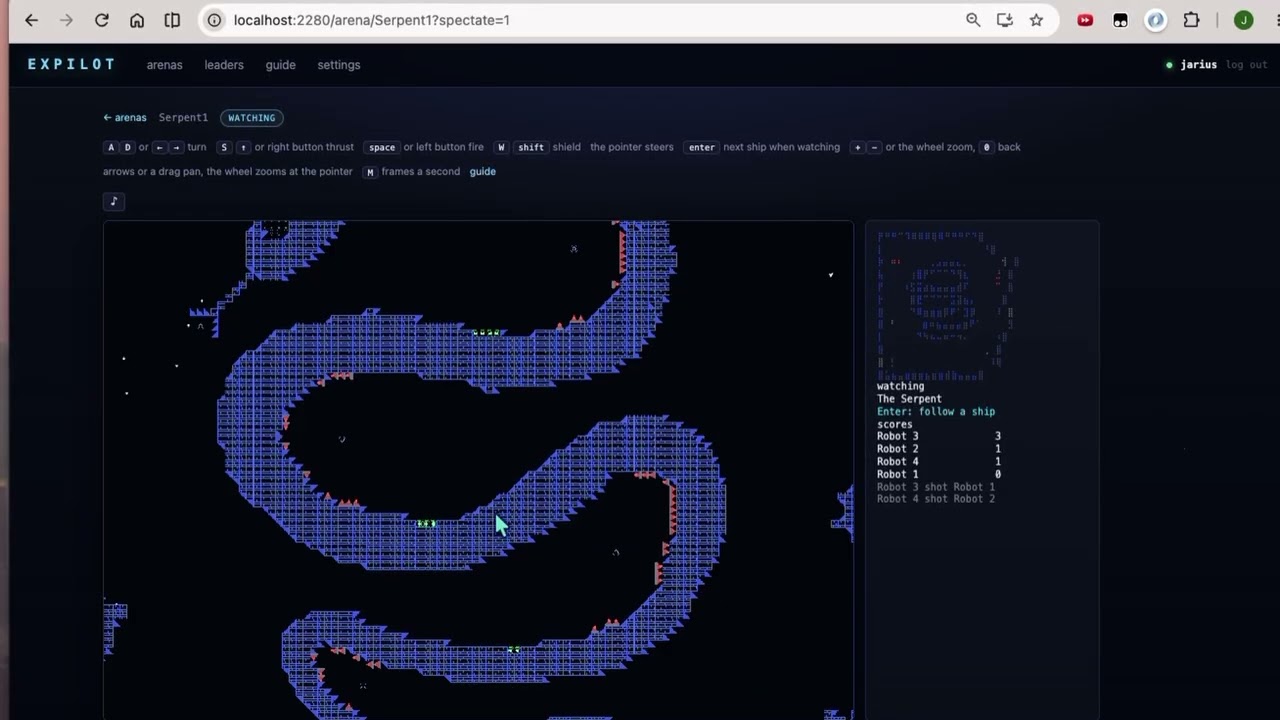
The server serves the game to browsers at `http://host:2280/` (`--http N` picks the port,
`--http 0` turns it off). Log in or make an account — the same accounts as ssh — pick an
arena, and play on a canvas beside ssh players in the same world: `a`/`d` or the arrows
turn, `s`/`↑` or the right mouse button thrust, space or the left button fire, `w`/shift
shield, the pointer steers, Enter steps through the ships when you are watching, `m`
shows the frames a second, and `♪` in the bar switches the music off and on. Sound plays
in the page, nothing to set up. Every arena card offers a team or a plain join and
`watch`; the guide page shows everything in the game with its sprite.
On a phone or a tablet the arena is the game alone — no bars, nothing to scroll: a
thumbstick steers and, pushed far, thrusts (it is analog: thrust grows with the push from
its ring to its rim); buttons fire, shield, fire a missile and thrust; fuel and score ride
over the world, `≡` opens the rest of the hud over it, `⇄` swaps the stick and the buttons
between hands, `♪` switches the music, `⤢` goes full screen and `✕` leaves. The pages
have a tab bar along the bottom; "Add to Home Screen" opens the game without the browser's
bars. `?touch=1` or `?touch=0` on any address forces the phone layout either way and is
remembered.
## On the desktop
`mix ex_pilot.desktop` opens a window played with the keys like the ssh client: `Enter`
from the title, pick where the arenas are — a server by its URL (log in or register), a
node, or this app — pick an arena, `Enter` joins, `w` watches, `t` picks a team; in the
arena `Esc` or `q` returns to the lobby. `h` on the title is the serve screen: ssh and web
ports, interfaces, accounts file and robots, `Enter` starts or stops the server. `--url`,
`--name`, `--node`, `--cookie` fill the fields in. Sound plays through your speaker.
## In a terminal, with everything
```bash
mix ex_pilot.terminal # play here, connect elsewhere, host, leaders
mix ex_pilot.terminal --name alice --url http://arcade:2280
```
The terminal has the desktop's flow: `Enter` plays the arenas this program carries, `c`
connects — to a server by URL or to a node — `h` hosts a server from inside (ssh, web, the
node name and cookie others need, calling on the local network so their connect screens
list it), `l` shows the leaders. `mix ex_pilot.play` is the same client with its own title
and only the local arenas; `mix ex_pilot.serve` is the headless server.
## Playing over ssh
```bash
ssh -p 2222 new@host # register: pick a name and password, then play
ssh -p 2222 alice@host # play
ssh -p 2222 -R 24713:127.0.0.1:4713 alice@host # play with sound
```
The game synthesises its sound on the server and sends it back down the reverse tunnel to
whatever listens on your machine's port 4713 — `ffplay` on any OS with `ffmpeg`
(`brew install ffmpeg`, `winget install ffmpeg`, `apt install ffmpeg`):
```bash
while :; do ffplay -nodisp -autoexit -fflags nobuffer -analyzeduration 0 -probesize 32 -f s16le -ar 44100 -ch_layout stereo -i "tcp://127.0.0.1:4713?listen"; done
```
`ffplay` ends when a session's connection closes, so the loop puts a fresh listener up for
the next one; on Windows the loop is `for /L %i in (1,0,2) do ffplay …` in `cmd` and
`while ($true) { ffplay … }` in PowerShell. Every account has its own port on the server
(24713 for the first registered, 24714 for the next…); the title screen's "No sound?"
(`n`, or a click) shows the lines with your own port, and `Esc` closes it. Start the
listener before or after the game. Someone with Elixir and this project on their machine
can run `mix ex_pilot.listen` instead of ffplay; `sox` and `pacat` work too
(`sox -t raw -r 44100 -e signed -b 16 -c 2 - -d < <(nc -l 4713)`,
`pacat --raw --format=s16le --rate=44100 --channels=2 < <(nc -l 4713)`).
The display setting picks pixels where the terminal has them, braille, or glyphs, and the
frame rate (auto is the terminal's best: 15 on iTerm2 and sixel terminals, 30 elsewhere).
Your own shipshape is read from `$XDG_CONFIG_HOME/expilot/<player>.shipshape`.
## Settings and your name
Sound levels, the pointer and keys are kept per kind of client — the terminal, the
desktop, a browser, a phone or tablet — in `$XDG_CONFIG_HOME/expilot/` and in your account,
so what suits a phone does not follow you to the desktop. The web settings page also keeps
a **nickname**, the name every client flies under and the boards show; the boards count by
account, so changing it keeps your record.
## Serving
`mix ex_pilot.serve --port 2222 --http 2280 --robots 4` runs ssh and the web in one
process; `--music personal | arena | dynamic | static | off` and `--sfx off` set how much sound the
server makes for each session. [TECHNICAL.md](TECHNICAL.md) has what a session costs, the
music policies, load testing, the files on disk and how the code is put together.
## License
MIT. The classic maps are community contributions with no stated licence and are fetched
rather than shipped; the XPilot source is GPL and was read, not copied.
The scores under `priv/scores` are LilyPond engravings from the Mutopia Project
(mutopiaproject.org) of music long in the public domain: Grieg's In the Hall of the
Mountain King (Coyau), Joplin's The Entertainer (Chris Sawer) and Mozart's Rondo alla
Turca (Rune Zedeler, Chris Sawer) are released to the public domain; the Prelude to
Bizet's Carmen (Alex O'S) is under Creative Commons Attribution-ShareAlike 2.5 and
Paganini's Caprice No. 24 (Samuel Rummel) under Creative Commons Attribution-ShareAlike
4.0, so the renders made from those two carry their engravers' names and the same terms.
The piano is the Salamander grand, CC BY 3.0 by Alexander Holm; the basses are FreePats'
fingered and picked electric bass and Karoryfer Samples' meatbass, all CC0.