Current section
Files
Jump to
Current section
Files
README.md
# DryDoc
<!-- @moduledoc DryDoc -->
Store all your docs in a README (or a few of them) and pull that content into
`@moduledoc` and `@doc` annotations at compile time. Then build an
entire docs site from there with [ex_doc](https://ex-doc.hexdocs.pm/). It seems
backwards, but this might just be the cleanest way to maintain a fetching Github
repo and [hexdocs.pm](https://hexdocs.pm/) presence without repeating yourself!
> [!TIP]
> Also provides styled markdown **admonitions** / **callouts** that work when rendered on Github.com AND when published on Hexdocs.pm ([ExDoc](https://ex-doc.hexdocs.pm/readme.html#admonition-blocks) uses a different syntax from [Github](https://docs.github.com/en/get-started/writing-on-github/getting-started-with-writing-and-formatting-on-github/basic-writing-and-formatting-syntax#alerts)).
## Installation
Add `{:dry_doc, "~> 0.1.2"}` to your list of dependencies in `mix.exs`, then run `mix deps.get`.
## Usage
Write a `README.md` file. Then, in the module of your choosing, either:
```elixir
# A. Use the macro:
defmodule YourModule do
import DryDoc
@moduledoc doc_from_readme()
@doc doc_from_readme(:your_func)
def your_func() do
...
end
@doc doc_from_file("SOME_OTHER_FILE.md", :your_other_func)
def your_other_func() do
...
end
end
```
```elixir
# B. Call directly:
defmodule YourModule do
@moduledoc YourModule |> DryDoc.from_readme()
@doc YourModule |> DryDoc.from_readme(:your_func)
def your_func() do
...
end
@doc DryDoc.from_file("SOME_OTHER_FILE.md", YourModule, :your_other_func)
def your_other_func() do
...
end
end
```
If you want to pull only certain sections from `README.md`, use annotations in the
README markdown.\
The `<!-- open --> ... <!-- /close -->` backslash scheme should
feel familiar to anyone who's written HTML.
```markdown
# Welcome to my README
<!-- @moduledoc YourModule -->
Only include this content in my @moduledoc.
<!-- /@moduledoc YourModule -->
Not this content.
<!-- @moduledoc YourModule -->
Oh, actually put this content in @moduledoc too.
<!-- /@moduledoc YourModule -->
Bye!
```
For function docs, add function name after module in the annotations:
```markdown
# Welcome to my README
<!-- @doc YourModule.your_func -->
This content is for the @doc of the YourModule.your_func function.
<!-- /@doc YourModule.your_func -->
```
## Transformations
<!-- @doc DryDoc.Transformations.github_admonitions_to_ex_doc_syntax -->
Github-flavored Markdown and ExDoc use different syntax for Admonitions,
aka "alerts", "callouts", "tips", or "notes". This transformation replaces
all Github admonition syntax with an alternate form compatible with ExDoc.
Github<>ExDoc style mappings (imperfect because admonition types don't match):
```
NOTE -> .info (blue)
TIP -> .tip (green)
IMPORTANT -> .info (blue)
WARNING -> .warning (yellow)
CAUTION -> .error (red)
```
<!-- /@doc DryDoc.Transformations.github_admonitions_to_ex_doc_syntax -->
Examples:
> [!NOTE]
> This will be displayed as a blue `.info` on hexdocs.pm
> [!TIP]
> This will be displayed as a green `.tip` on hexdocs.pm
> [!IMPORTANT]
> This will be displayed as a blue `.info` on hexdocs.pm
> [!WARNING]
> This will be displayed as a yellow `.warning` on hexdocs.pm
> [!CAUTION]
> This will be displayed as a red `.error` on hexdocs.pm
<!-- @doc DryDoc.Transformations.github_admonitions_to_ex_doc_syntax -->
**References:**
- https://ex-doc.hexdocs.pm/readme.html#admonition-blocks
- https://docs.github.com/en/get-started/writing-on-github/getting-started-with-writing-and-formatting-on-github/basic-writing-and-formatting-syntax#alerts
<!-- /@doc DryDoc.Transformations.github_admonitions_to_ex_doc_syntax -->
## Extras
```diff
# mix.exs
defmodule YourApp.MixProject do
...
defp docs() do
[
...
+++ before_closing_head_tag: &DryDoc.before_closing_head_tag_hide_pages_tab/1,
]
end
end
```
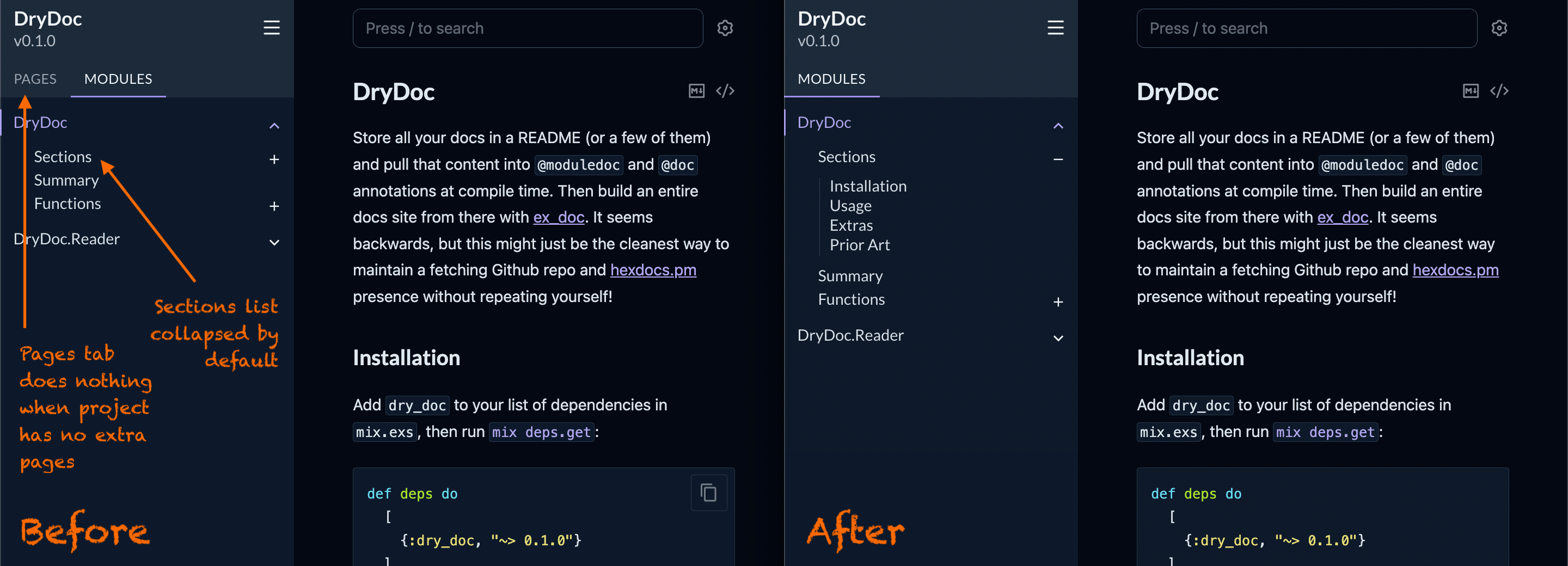
For simple projects that don't have any "extras" to live in the "Pages" tab on the
generated Hexdocs site, it can feel simpler and clearer to hide this tab entirely.
Docs then live in a single place: the `@moduledoc` of the main module of the project.
Add `&DryDoc.before_closing_head_tag_hide_pages_tab/1` to your `docs()` in `mix.exs`
to hide the "Pages" tab.
```diff
# mix.exs
defmodule YourApp.MixProject do
...
defp docs() do
[
...
+++ before_closing_body_tag: &DryDoc.before_closing_body_tag_expand_sections_list/1
]
end
end
```
When your Hexdocs site by default lands on the main project module, and your README
is shown there via the `@moduledoc`, it can be beneficial to auto-expand the
"Sections" list in the left sidebar to give a visible "table of contents" of your
docs right off the bat (and also let readers easily navigate to a specific section,
if they wish).
Add `&DryDoc.before_closing_body_tag_expand_sections_list/1` to your `docs()` in
`mix.exs` to automatically expand the "Sections" list on page load and when the
sidebar is opened on mobile devices.
### Extras Before / After
## Prior Art
Inspired by [Vapor's](https://github.com/elixir-toniq/vapor/blob/main/lib/vapor.ex)
moduledoc style, and
[this forum post](https://forum.elixirforum.com/t/ex-doc-how-to-configure-so-it-lands-in-the-readme-md/53244/4)
pointing to it.
<!-- /@moduledoc DryDoc -->
## License
MIT